-->
DISCLOSURE: This blog contains Google Adsense ads and affiliate links to Creativebug via which potential commissions are earned when visitors click through.

Search This Blog > > >

Showing posts with label online learning. Show all posts

Saturday, 4 April 2020

In Memoriam Craftsy

RIP Craftsy: 2011 - 2019
Where are you getting your sewing inspiration from these days?

If one of your responses is "from blogs like yours", let me thank you on behalf of me and my fellow sewing bloggers for the support.

In my case, the majority of my current sewing inspiration seems to come from YouTube. It's a reality I would never have seen coming a few years ago.

Shortly after I got back into sewing in 2012, I discovered Craftsy. Over time, I would visit on a daily basis, read their blog posts, scan their indie patterns and generally soak up the community spirit. Eventually, I set up shop to sell my patterns there. For someone with only a small presence, I was fortunate enough to amass ninety-three followers in the two years before "the change" happened.

In 2016, the community aspect largely went bye-bye when the website was revamped. Crafters lost the connections that they had made with designers and Craftsy itself began to morph into something else entirely... which, of course — as we all know now — was the beginning of the transformation into Bluprint.


Check out crafty classes at Creativebug!
[affiliate link]


When I wrote that blogs seemed to be disappearing a few months ago, I went to Bluprint to check if they had reinstated their former blog. Not only is the answer a disappointing "no", I subsequently found out that their main blogger had been let go during the transition from Craftsy.

Blogs are community oriented. They exist to share information among those of similar interests. Through the process of commenting, the helpfulness of a blog post can be multiplied many times over. Upon further digging, I discovered that Bluprint's new way of sharing the old Craftsy blog posts was to strip them down to bare essentials and call them articles.

Take this one for example. It originally appeared on Craftsy's blog in May of 2015.

A sample Craftsy blog post turned "article" in Bluprint...

I remember seeing it, and bookmarked it for all of the helpful comments that accompanied the post. Those comments are no more... or at least I can't see them. This is what appears at the bottom of the "article".

You need to be a subscriber in order to leave a comment?

Even though I have a Bluprint account, it looks like I need to subscribe to their streaming service in order to "join [in] on the conversation". Now, I am not entirely convinced that if I were a subscriber that those old comments will suddenly be visible, but that might be the case.

Sadly, no.

Here is an example from an article about how to adjust the tension on your sewing machine. The link now goes to an article dated November 4, 2019, but I'm positive that I bookmarked it way before then. I can't say with any confidence how many comments were under it when it first appeared many years ago, but this is what you get now.

Any comments that you see will be more recent one from Bluprint's time...

We can safely assume that only new comments from the time of Bluprint's takeover are attached to these articles, and that comments from their time as Craftsy's blog posts are simply gone.

On the other hand, don't let the loss of the community input put you off from appreciating these articles. Here are just some of the topics that you can read up on (and maybe save).

Just a few of the old Craftsy blog posts that can be found on Bluprint...

The last two are special to me. The one featuring 7 fast and free patterns includes my shopping list and coupon holder. The last one is just more love for my own vintage machine.

Anyway, this has been a long way around to saying that I miss Craftsy's blog. Along with the interaction that crafters had with designers and vice versa, it was the foundation of a very welcoming and friendly community.

I haven't been able to find anything similar under the new Bluprint banner.


Watch live classes for FREE at CreativeLive! Sign Up at CreativeLive
[affiliate link]


If you're the sort of person who likes the "behind the scenes story", look up Craftsy Bluprint on craftindustryalliance.org. The origin of Craftsy, what it was meant to be and what Bluprint is now doing can be found in the relevant posts and in the comments from various users.

You won't have to dig too deep to comprehend what Bluprint's priorities are when responses to customer concerns consist of fluff and self congratulations such as what you see in the following example. This review (from a person named Helen) and subsequent response was posted on Trustpilot.com last summer.
The takeover of Craftsy by NBCUniversal has been an object lesson in how not to take ownership of an existing successful business. They have alienated designers by unilaterally deciding to close down their pattern design store to new entries and drastically reducing the number of patterns in the store. I can understand that they wanted to get control of something that was getting out of hand, with possible copyright violations; however the store had been in existence for many years, could they not have maintained it until they had a replacement store ready and fully tested, with appropriate safeguards built in? It could have been a selling point to both designers and purchasers if they had put in place more robust checks around copyright and quality, we may have been prepared to pay more for such designs.

They have alienated their paying customers with unhelpful, unstable apps. The new Bluprint apps on both Android and IOS platforms have been flaky over the last few months. I have the latest operating systems and a very fast internet link, but these apps have frozen or acted up in many mysterious ways.

As a major purchaser of Craftsy classes (nearly 300) I also find it unnecessarily difficult to find my own forever classes. As far as I can tell I cannot search for a particular class or tutor as I can in the Craftsy app, I have to manually scroll through all my classes to find the one I want. If I forget to go to the own forever library option and just click on the continue to watch option I am asked to take out a subscription for a class I already own. I work in IT and see this as a fundamental flaw in the software coding. I am already logged in, it knows which classes I have purchased, it should be relatively simple to combine these two factors to allow me to watch my classes no matter where I find them on the site. Where was the user testing before going live? I project manage software rollouts as a living, if this had been my responsibility I would have expected to be sacked months ago.

NBCUniversal seem to have changed the editorial policy, concentrating on ‘celebrity’ content and reruns of tv shows, rather than employing recognised craft professionals. This content is not the solid ‘how to’ information that we were used to, treating Bluprint as just another TV channel rather than an online community. This is not necessarily a bad thing, but I would like a way to differentiate between these types of material. It must be particularly hard for new users of the platform to find the really good classes. I would still recommend a Bluprint subscription to people who have never used the platform, but probably only for the year it may take to watch the older classes, not as an on going subscription service.

Even before it became Bluprint the length of time in each series of classes had greatly reduced. I didn’t mind that they cut out the often long winded introductions by each instructor. I do not need to see people stitch every single seam of a garment in real time, or stand around watching something boil on the hob, however the recent classes were very short, from half an hour down to 15 minutes. I understand attention spans have shortened, but that would argue for 20 short lessons to get the same information that were in 6 longer lessons, not reducing a whole course down to an hour and a half. These classes are certainly not worth the same amount of money as one off purchases. Initially I took out a subscription to Bluprint, but after 6 months of no new interesting classes I cancelled my subscription. Every six months or so I check back to see if any of the new content excites me enough to re subscribe, however nothing has caught my imagination yet. For the small amount of new content I want to watch, I have temporarily subscribed during ‘free’ offer periods, binge watched the relevant content and then unsubscribed as soon as the charges kicked in.

Bluprint could be good, however they have alienated so many people that it will take a lot of positive marketing and most importantly good new content, to recreate the positive comments and loyalty that Craftsy once enjoyed.

The official response from Bluprint was the following:
Hi Helen! Thank you for taking the time to write a review on Bluprint. As of January 2019, Craftsy became Bluprint! When you log into your account or go to the site, you will see that we have the same content. We have just given things a fresh coat of paint. Back in December, we made significant changes to the Pattern Marketplace. This included removing many patterns, including patterns from our top designers. We notified the designers of this change and kept a few of these patterns available on the site. We do understand that this was a favorite place for everyone, but we had to temporarily remove access to the marketplace to make changes. We look forward to inviting more designers and having more patterns available in the near future! To address your concerns with finding your own forever classes, it sounds like you may have a duplicate account with us. Please reach out to us through the link below and we'd be happy to get everything cleared up for you: http://bit.ly/2RrEHrw

I don't need to tell you that the response was woefully inadequate. But do you know what also irritated me about it? The crazy use of exclamation marks. To me it felt like I was in mourning over the "friend" that we'd all lost in Craftsy while the new upstart was excited about taking its place.

Also of note was how the response highlighted the annihilation of the pattern marketplace. Most of the independent designers' pattern shops were shuttered in December 2018, with very little notice. (I posted about it briefly here.)

In a response to another person's review about how the loss of that marketplace has affected her, Bluprint writes (in June of 2019):
First, we regret that we made you feel this way. It's never our intention to make our community members not feel valued. To provide more insight, the Pattern Marketplace was a platform that people could access and share their patterns. We felt that this was a great way to create a community with other crafters, but we did not foresee people taking advantage of the platform. We have had issues with people taking credit for designs that they did not make, and much more. To help combat this, we closed the market place and kept a few patterns from our top designers. We are currently working on improving the marketplace so that people can continue to share their awesome work! We are fans of Ravelry and do suggest their patterns as well. We do look forward to opening up the pattern marketplace for all designers in the near future.

At this point (a year and a quarter later), I don't believe that Bluprint has the need or the want for an improved pattern marketplace. I spent most of last year thinking that it would come back, but the more I saw of how Bluprint was carving out a different niche for itself, the more I began to realize that there was no sympatico going forward.

My having access to a new and improved way of selling PDFs doesn't seem to align with Bluprint's desire to deliver TV-style edu-tainment with a celebrity focus and easily consumable sound (video) bites. It's further evidence of the world being a topsy-turvy place these days, where people appear to value fame and self-promotion over actual experience and expertise. Where Craftsy's original classes were led by instructors who had in-depth knowledge of crafting, the current trend with Bluprint is to find famous people who like to do lifestyle "things".

Apparently, it's what Bluprint's market research has told them to aim for, rightly or wrongly. My guess is that they still haven't achieved the subscriber base than they originally hoped for, which is unfortunate for everyone concerned. All that said, if Bluprint's subscription model appeals to you, my recommendation is to go for it, given the greatly reduced rates they are offering.

The unfortunate reality is, if this company decides to close up shop, they'll be leaving a lot of customers from the early years of Craftsy in the lurch, without access to the content that they purchased on the assumption that it would be there forever.

Sometimes, "forever" isn't really forever.

'Til next...


Saturday, 17 March 2018

Making a First (Mini) Quilt

Criss Cross Mini Quilt by eSheep Designs
A closeup look at my first (mini) quilt...
During Craftsy's free access weekend a couple of weeks ago, I sat in on a class that surprised me on several levels. It was Suzy Williams' Fabric Play: Sewing Mojo Minis.

First of all, it was surprising that I gave my time to a quilting class. Nothing against quilting; it's just something that I've never had much interest in pursuing.

Second of all, I was surprised that I was so jazzed by the end of the class that I wanted to make one of those fun "mojo minis" for myself.

Third of all, no more than ten days later, I did make myself a mini quilt... even one of my own design.

"Unity"
I took the general concepts from Suzy's first and last (shown here, named Unity) mojo minis, incorporating straight lines in place of the curves, ending up with something similar but with edges that I could actually finish. (While I liked the look of the original Unity, I didn't want to make a "raw edge applique" type of quilt. Besides, the whole point of the class was to inspire oneself to create — more or less — on the fly. For that to be totally fulfilled, it didn't quite make sense to replicate someone else's design to the letter.

It's funny, but from a couple of the reviews that I read for this class, I take it that some quilters are extreme rule followers and don't appreciate this type of "freestyle" quilting. For me, it was exactly the "no rules" approach that drew me to this project.


And now without further ado, may I present my mini masterpiece... LOL!

Criss Cross Mini Quilt by eSheep Designs
My Criss Cross mini quilt...

This is the size of a sheet of paper, 8.5" x 11" (the ones in the Mojo Minis class were 11" x 14"). It took me four to five hours to make from start to finish, with the quilting taking up the last hour and a half. (With about twenty minutes to go, I was pretty much wanting it to be over, so I know that I still don't have much interest in — i.e., patience for — taking up quilting!)

Criss Cross Mini Quilt by eSheep Designs
This element turned out looking like a tribute to one of my other interests... know what I'm referring to?

Not knowing if I'd end up framing it, in anticipation of hanging it up "as is", I zigzag stitched all around the outer edge and then sewed a narrow binding on top of it. (The mini quilts in the class were matted and framed and therefore it didn't matter that the edges were left au naturel.)

Days later, I found a spare frame in the house and put my work under glass.

Criss Cross Mini Quilt by eSheep Designs
Must admit, the frame is a nice touch...

Picking the colours/selecting the fabrics that I wanted for my quilt was easy enough. The black and white with red highlights combo is sort of my "theme".

Criss Cross Mini Quilt by eSheep Designs
Choosing fabrics for my mini quilt...

The tiny bit of red Robert Kaufman Kona Cotton fabric is a scrap from my original Craftsy order some years back. The black accents were recycled from the cover of one of the couch cushions that I took apart last year to make my P & P throw pillows. (Yay for recycling!)

Criss Cross Mini Quilt by eSheep Designs
This strip of fabric is one of my Spoonflower creations...

Finally, I wanted to feature a single strip of printed fabric among the solids. The strip comes from my Psychedelia collection on Spoonflower, called Spirographing.


Watch live classes for FREE at CreativeLive! Sign Up at CreativeLive
[affiliate link]


If you too want to jumpstart your creative energy by making a mini quilt, here's the general process.

Draw a Pattern


Take a sheet of paper and draw a pattern, extending the lines all the way to the edge. Here's mine (feel free to use it if you wish).

I then numbered the various "strips" so that they could be easily identified later.

Criss Cross Mini Quilt Pattern by eSheep Designs

My original mini quilt pattern...

It was then scanned and loaded up into PSP so that I could explore options for colour and fabric placement.

Determine Fabric Placement


Here are some examples of what happened while playing around with the pattern in Paint Shop Pro.

Criss Cross Mini Quilt Pattern by eSheep Designs
Creating some sample placements for my fabric...
I settled on the first option and placed a pattern strip in various locations on it. When I got this...

Criss Cross Mini Quilt Pattern by eSheep Designs
The final plan!

... it turned out to be what I wanted as my fabric layout.

The white is the background. I used a piece of cotton twill from my stash that I interfaced with fusible fleece (since I don't own any quilt batting).

Create Templates


At this time, I went back to my original drawing and wrote down the colours on each of the strips. I indicated with arrows where seam allowances would be needed.

Criss Cross Mini Quilt Pattern by eSheep Designs
Transferring the plan back onto the paper...

I then made a copy of this to cut up.

Criss Cross Mini Quilt Pattern by eSheep Designs
Cut template strips...

Of course, I only kept the black and red strips after cutting up the second copy of the pattern (the white being my background).

While laying down the pieces on top of the original copy, I identified other areas where a seam allowance was needed, namely for the strips that would be overlapped by a top layer strip. In the drawing above, the first (bottom-most) layer is made up of strips 12-18, the second layer is made up of strips 5-11 and the top layer is made up of strips 1-4.

Therefore, I had to add a seam allowance to strips 6, 8, 9 and 11 at the edge where they go under strip 4.

Cut Fabric


I placed the individual paper templates onto fabric and cut around them with a rotary cutter, roughly including a 1/4" (6mm) seam allowance where I had my arrow pointers. The idea is that this is meant to be an imperfect creative exercise, with no need to be exact; hence, no actual measuring.

Criss Cross Mini Quilt Pattern by eSheep Designs
Quilting strips all cut out...

And this is what my collection of strips looked like when I placed them down on my pattern sheet.

I then spent some time with the iron, pressing the seam allowances.

Attach Components to Background


The next step was to lay down the strips onto the background piece. Once I had a grasp of where things had to go in terms of first, second and top layers, I started stitching the strips onto the background.

Criss Cross Mini Quilt Pattern by eSheep Designs
Pinned and ready for sewing...

For the most part, I had to start with the bottom most layer and work my way up, but there are always pieces that aren't affected by any layers that can be stitched down quickly, like the two black corner pieces.

Criss Cross Mini Quilt by eSheep Designs
Sewing two side by side strips...

Wherever I had two strips side by side, I put one on top of the other as shown above (in this case, I would then stitch on top of the red strip to secure both it and the black strip to the background).

In the Mojo Minis class, the strips were glue basted, but I found that I didn't need to do so here.

By the way, I used gray thread for my sewing/quilting. (The hand-sewn stars were, of course, done in red and white thread.) I use gray quite a bit for many applications where it might be customary to use white or black; I like that it's darker than white and lighter than black.

Quilt Away


All that's left after the strips are sewn down is to quilt to your heart's content. As you can see, apart from the machine quilting, I also added some hand-sewn embellishments (the stars). I have no experience or training in quilting, so what I liked most about this was the freedom to do as I saw fit.

If you're in the same boat, just do what you feel like doing. In the Mojo Minis class, it was almost the goal to be random and irregular. Fortunately or unfortunately, I tend to be "ordered" by nature, so most of what I did ended up with some symmetry.

But you know what? This really is the kind of project where you can just pass the time mindlessly, forgetting any troubles and rejuvenating yourself creatively. I know I said that near the end, I was ready for the quilting part to be over, but throughout the whole making process, I was quite enjoying the experience.

Who knows, I may do this again sometime.

Criss Cross Mini Quilt by eSheep Designs
For those of you who are quilters, what do you like most about quilting?


Saturday, 10 March 2018

How to Maximize the Value of Your Craftsy Unlimited Experience

image courtesy of Craftsy...
Last weekend, Craftsy opened up its virtual doors to free access for everyone. If you were meaning to join in, but weren't able to fit it into your schedule, let me give you some pointers about how you can maximize the value of your browsing time.

How you approach this "all you can craft" buffet will depend on your interests and level of experience (not to mention, the amount of time you have available). For example, if you're a relative newbie at a few crafts — and remember, Craftsy has courses running from baking to woodworking — you should plan your visit by making a list of classes that you want to see and prioritize them according to your schedule.

From my position as an experienced sewer (with no interest in sewing clothing, which greatly reduced the number of sewing classes that caught my eye), I discovered that I neither wanted nor needed to see as much as I originally thought.


GRAB THE CLASS MATERIALS

What I mostly did was jump in, fast forward past the introduction, stay long enough to get the "flavour", and then download the class materials if I was interested. (I almost hate to say this, but if you have a certain level of experience, just grabbing the class materials will enable you to get 90% of the benefits of a class. As I've recommended to folks who have purchased classes on Craftsy to save them for later viewing, download the materials sooner rather than later.)

After this initial "nibbling", I came back to the classes that most interested me and watched them reasonably thoroughly; I ended up completing three, with definite plans to "make something" based on what I'd seen. Considering that Craftsy has over 1,300 classes, that was a pretty good winnowing down of my needs, don't you think?

image courtesy of Craftsy...
But that's what's important to keep in mind: don't let the size of the buffet distract you or scare you off. Just as with a food buffet, go directly to what you like the most, first. There's bound to be content that you don't need to take in at all.

And speaking of food, the last thing I wanted to watch was a cooking class (given the number of food shows on TV), but I went in and grabbed some materials — i.e., recipes — from the Low & Slow BBQ at Home, Cinnamon Rolls: Classic to Contemporary, Coffee Shop Cakes: Good to the Last Crumb, Mexican Comfort Food: Enchiladas, Tamales & Rellenos, and Mexican Street Food: The Basics classes. I know my way around the kitchen enough to follow a recipe and those specific ones were intriguing enough for me to want to keep for future reference.

That's right: this buffet lets you take stuff home with you!

PICK UP YOUR PERKS

As a member of Craftsy Unlimited, you're entitled to monthly perks in the way of new content that is supposedly not available to non-members.

image courtesy of Craftsy...

The graphic at the top of this post is a shot of the landing screen of Craftsy Unlimited. The white menu bar provides a link to new PATTERNS. Here's what I found when I was there last weekend.

image courtesy of Craftsy...

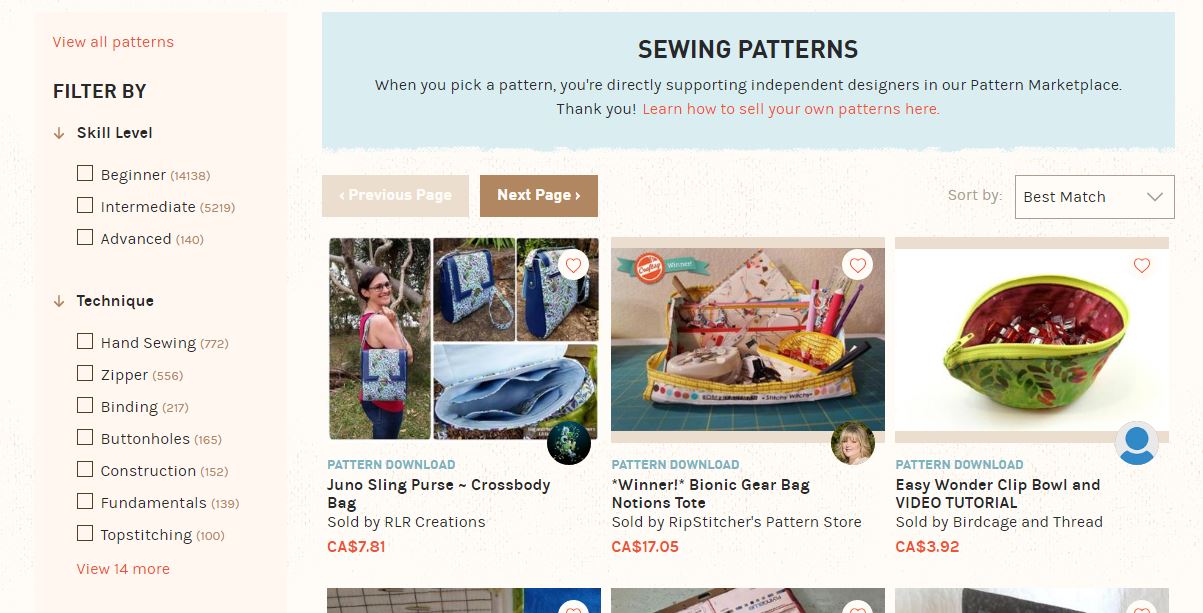
This is a set of free sewing patterns. I downloaded the last one, which is a reversible bag pattern called Livia by RLR Creations. The second one is obviously an apron. The first one is hard to see; it's a wristlet pattern.

I know what you're thinking. There's nothing earth-shatteringly new or unique about those patterns, and my assumption is that there never will be. However, they're a free component of the Unlimited membership and perhaps reason enough for some folks to continue from month to month.

Not to be outdone, here's a set of free quilting patterns.

image courtesy of Craftsy...

And here is a set of free knitting patterns.

image courtesy of Craftsy...

Last but not least, here is a set of free crochet patterns.

image courtesy of Craftsy...

I found that I could download the January patterns as well as the current month's patterns. I don't know if accessibility to past free content will continue to be the case for memberships going forward.


Watch live classes for FREE at CreativeLive!
[affiliate link]


SLOW DOWN & SAMPLE

Finally — just as a regular food buffet presents a great opportunity to try out new foods — after you've taken care of your priorities, use your Craftsy Unlimited trial to sample some of the other offerings.

One of the classes that I watched through from beginning to end was this one. It's called Fabric Play: Sewing Mojo Minis with the truly effervescent Suzy Williams.

Coming into the free weekend of Craftsy Unlimited , it was not a class that I would ever have guessed would catch my attention (not being a quilter), but catch my attention it did. The title may have been the kicker, as a couple of weeks back, I had been in a creative funk. This class (which I will likely be back to discuss in greater detail at some point) was extremely helpful in amping up my creative energy.

It's a perfect example of something that I had no previous inclination of sampling, that arguably had the biggest impact on me after the freebie weekend at Craftsy.

Maybe there's a similar surprise waiting for you.


Saturday, 21 January 2017

Craftsy: A Little Less Cozy & Friendly?

Chickens running around with their heads cut off
Don't be like these headless chickens...
I've been patient in holding back my true feelings regarding the recent site overhaul at Craftsy.

Having worked in IT and knowing how hard it is to roll out a significant update, whether it be a website or a system application, I tried to be understanding. However, it's been over three months — an official "quarter" in business terms — and initial irritations may have taken root to become persistent problems.

No, it wasn't a good idea for them to attempt a full launch while seemingly much of the core functionality was still in flux. How they handled things in the immediate aftermath — giving the impression of chickens running around with their heads cut off — was even worse.

[By the way, now that I've given myself permission to vent, let me forewarn that this is going to be a long post.]


Craftsy's core product — online classes — apparently suffered greatly with the revamp, in terms of people being able to find, access and view their classes. Ironically enough, the greater number of classes you have in in your personal library, the harder it is to navigate and find the one that you want. That is to say, the site revamp actually managed to punish the best customers.

comment image courtesy of Craftsy
No shortage of issues from a user perspective...

Even if you only use Craftsy to buy product, the site revamp has adversely affected that user experience too. I've read many comments from users about paging through products, clicking on something of interest and then being stymied by peculiar behaviour from the site that requires them to "start over" again at page one.

comment image courtesy of Craftsy
Making an e-commerce site hard to navigate is not an improvement...

In that respect, I am astounded, as I totally "get" that this site redo was a business (read: money) motivated decision. It was obviously undertaken to increase the e-commerce potential of the company. As a former business owner, I am all for free enterprise. But good heavens, if you are trying to increase profits online, it would be wise to make the browsing experience less of a horror story.

Surely, you don't want to piss off your existing customers to the extent that they'll want to tell everyone.

But it's not just that. These issues are likely to be fixed at some point, if not already. (I wrote most of this post over the Christmas holidays.) Others, I'm not so confident about.


Start your FREE TRIAL at Creativebug!
[affiliate link]


It's always been at the back of my mind that sites providing a free service to the masses are invariably ephemeral in nature. Craftsy built itself a massive foundation of users by catering to indie designers and offering an outstanding affiliate program early on. (I can only imagine the type of money that some blog owners were making back when Craftsy offered $2 per lead to their affiliates!) With craft bloggers firmly onside, word got out quickly about the community that Craftsy was offering to small time folks who wanted to dabble in pattern design.

What better enticement than to say, hey, we'll offer you a free platform on which to sell your PDFs... and look at all the users who are already pre-qualified to buy from you? Even before I started this blog, I knew I wanted to sell my patterns via Craftsy. Because quite literally, no other place offers such a sweet deal.

All things considered, you have to admire their business model.

But change may be on the horizon... as it always inevitably is.

Before the revamp, I could look at the profiles of users who had chosen to follow me (and I was extremely grateful for that surprisingly numerous and growing group) and see what classes they were taking and what their various talents had created. Crafters who had enrolled in the same classes could easily share their projects with everyone else. (I may be wrong, but there doesn't seem to be any way right now to upload a project picture of any kind unless you are reviewing a pattern.) I'll admit that most days, I had neither the time nor the desire to scroll through everyone's work, but if I wanted to, it was there.

But just like so much internet dust, all of that was blown away with the site overhaul. I no longer have access to those individuals and those individuals no longer have access to me — at least not directly. (Although here's a bit of an interesting FYI: even if you've only ever "purchased" free patterns, your email address is now readily accessible to the pattern designer, a change you may not agree with or feel comfortable about.)

On the matter of reinstating the "followers" list, I started the following exchange with Craftsy's support team...

Inquiry to Craftsy
My inquiry to Craftsy support...

... but somehow I don't expect this feature to be resurrected, given that it was so obviously left out of the rebuild, and this standard reply...

Craftsy support reply
Reply from Craftsy...

Like being trapped indoors in a dark dreary winter, the Craftsy experience — which used to be inviting, inclusive and connected — is now cold and unexpectedly lonely.


Watch live classes for FREE at CreativeLive!
[affiliate link]


Oh, and as for the second question that I asked (which should have been easily answered by a "yes, it will be back" or "no, it won't be back"), I was given a generic reply about new features continuing to be released and please to check some link — which, until just days ago, had not been updated in over a month — to keep up to date.

Several weeks later, I tried again. It had come to my attention that every time I accessed the Craftsy sewing pattern page, the same suite of patterns showed up on what is known as the "landing" page. (Under the guise of "best match", even though this is prior to selecting any search criteria, so what are they "best matching"?)

I tried it in two different browsers, then tried it under an anonymous browsing window and they all delivered me the same result.

image courtesy of Craftsy
Deja vu every time I access the sewing patterns page...

I thought, wow, lucky designers who have their patterns put out in front of everyone's eyes so easily! What about the rest of us? Shouldn't this page be random or newest first? If indeed these patterns are the most popular (which I doubt), shouldn't that — in the name of fairness — be a category that can be manually selected via the drop down rather than automatically chosen for us?

June responded again, reporting that the order is random (?!) and that she would let the almighty Engineering Team know about my issue. Then it became obvious that she may only have skimmed my message because she plunked in a standard response that did not even have anything to do with my query. (She effectively told me that I should be careful to categorize my own patterns under the right headings to ensure that they would be seen via searches.) I replied with an honest but polite assessment of her response and ended my email with "If you guys truly appreciate us sharing our thoughts and feedback, and you truly are 'here to help', you might show it with more helpful responses to our questions other than — essentially — we'll tell someone you said this."

I ultimately did get an explanation about this screen: "...the placement of patterns when we launched the new site was completely random, though sorting order will not change with a new visit. That said, I do understand your concerns and feedback and I've shared it with our Engineers to ensure your voice is heard. While this is a completely free pedestal to sell patterns, we want the best experience possible for our designers." Is it just me or does that last sentence sound a bit like a polite version of "hey, this is a free service, like it or lump it"?

Sigh.

Getting back to one of my previous points, though, the overriding opinion from those who have expressed their lack of enthusiasm over Crafty's reboot involves a sense of mourning over a community that was virtually trashed, with personal connections lost.

comment image courtesy of Craftsy
Apparently Craftsy was censoring the word "stupid"...

Literally, nothing was added to improve that area, while pretty much everything that could be done to decimate it, was done. I have little confidence that any of it will be restored after the fact. Meanwhile, new features meant to boost the commercial aspects of the site — coupons! — were touted as having been requested by the user base.

In my reading, I have only come across one user who claimed to have been surveyed for the site rebuild. Her comments reminded me of what I used to hear from jaded business clients when I acted as the liaison between users and developers: you ask us, but they've already decided what to do.

comment image courtesy of Craftsy
"We'll ask for input but we've already decided how we're going to do it..."

The thing is, even if we had all been in an uproar over needing coupons, I doubt we would have opted to sacrifice the supportive community and "home" that Craftsy has been to us in exchange for that.

In the meantime, it seems the folks behind the scenes are of the opinion that we'll all come around in time. They continue to thank us for our already depleted patience. Depending on individual circumstance, maybe we will and maybe we won't. One thing seems certain... Craftsy won't ever be what it used to be.

What are your thoughts on the new Craftsy?


Saturday, 19 March 2016

Lurking & Learning at CreativeLive

Disclosure: I am a member of CreativeLive's affiliate program. This post contains affiliate links through which I may be compensated when visitors click through and make a purchase.

Flower made by eSheep Designs from Robert Mahar CreativeLive class
I made this giant paper flower after lurking at a CreativeLive class...
you probably can't tell by the picture, but it's 15" (38cm) across!
I admitted this some time back, but it's worth repeating to provide some context for this post: I am not a course or class taking person.

Some people find that fact about me really odd, considering I spent several years in a variety of classrooms teaching others. The truth is, I really don't have the patience to be a student. (Don't get me wrong... back in my younger days when it was my "job" to be a student, I was a model student!)

My learning methodology as an adult, however, involves "jumping in and jumping around", which — interestingly enough — very much goes against my mostly organized state of being. Or a regular class syllabus, for that matter.

Still, when I discovered CreativeLive several months ago, its setup was intriguing enough for me to pop in and soak up some "learning".


If you need a refresher about CreativeLive, it offers classes running the gamut from "how to make your dream trip a reality" to "thrift store shopping 101" to "protect and profit from your intellectual property". All classes are broadcast according to an established schedule and are offered FREE during that time. Original broadcasts are live and therefore take as much time as needed; i.e., three days if a three day course. If the class is a re-broadcast, it is shown on a continuous loop for twenty-four hours.

To date, I have "popped in" on several classes, including Betz White's Build Your Own Tote: Interior Details and Build Your Own Tote: Customized Exteriors, Vicky Howell's Monetize Your Craft, Bonnie Christine's Design Surface Patterns from Scratch, Robert Mahar's Paper Crafting: Skills & Technique, and Molly Hatch's Pattern Design: From Hand to Screen to Surface. With the exception of Betz's classes which I was pretty much able to see all of, my "attendance" at the other classes was somewhat spotty. But here's the thing: I learned something in each one.

Flower made by eSheep Designs from Robert Mahar CreativeLive class
Close-up of the giant flower that I made after Robert Mahar's class on paper crafting techniques...
the center of the flower is made out of an entire sheet of 8.5" x 11" paper.

What did I learn? Well, let's take a closer look at each of the above...

Betz White's Build Your Own Tote: Interior Details &
Build Your Own Tote: Customized Exteriors

You know how you "sort of know" how to do something, but then it instantly clarifies when someone does it in front of you? That's how I felt for the concepts that Betz hit upon during these two classes. Nothing was really new for me here, but seeing it done on the fly for no particular project — and that's the neat thing about these two classes — really reinforced the various techniques. What did I value the most? The tips about installing piping in the "exteriors" class. (Betz has a "part one" to complete this bundle of three classes — Build Your Own Tote: The Basic Bag.)

Vicky Howell's Monetize Your Craft

Take advantage of current promos!
A lot of what Vicky presented in this class did not/does not apply to what I want to do, but it was darn interesting to hear! She has an amazing background and loads of experience to share if you want to do the difficult work of selling what you make. She's a great presenter, too, which is usually the hardest part for people to master in these new classroom environments. What did I learn? Sometimes things happen in the most peculiar ways: know when to go with your gut!

Bonnie Christine's Design Surface Patterns from Scratch

I don't have Adobe Illustrator and have never used it, but my graphics program of choice (Paint Shop Pro) has some of the same capabilities and many of the same concepts as what was shown here. Overall, it was just very interesting to watch someone create original designs on the go, and Bonnie knows her stuff. My surprising takeaway from this class? The SHIFT-click combination on the elliptical tool draws a circle! (Yes, even in PSP; you would not believe the steps I used to have to go through to ensure that my ellipses turned into perfect circles!)

Robert Mahar's Paper Crafting: Skills & Technique

I missed most of Robert Mahar's lessons on making the giant paper flowers — my schedule did not match well with that portion of his class — but I managed to come away with enough info to make that big flower (and these subsequent smaller ones) that you see decorating this post.

Flowers made by eSheep Designs from Robert Mahar CreativeLive class
This is going to be a Mother's Day "bouquet" for my mom...
each leaf is crafted out of a single sheet of 12" x 12" scrapbooking paper!
(That's a pink highlighter pen to give an idea of scale.)

No bad for a first effort on a lesson that ended unexpectedly, huh? (Well, it wasn't unexpected, just bad timing. Not only was I was in the middle of trying to cook dinner, the end of the twenty-four hours came right when he was describing how to assemble the flower... and I never did get to see the part about making the leaves. Luckily, I managed to find a tutorial for them elsewhere on the web.)

Oh, and I found his lessons on paper marbling totally fascinating!

Molly Hatch's Pattern Design: From Hand to Screen to Surface

It was surprisingly interesting to see someone's hand-drawn creations come to life from paper to product. This time the software used in between is Photoshop (which I also do not have and have never used), but as with Bonnie Christine's course using Illustrator, there are similar enough elements among all of the graphics programs that I could benefit from the demonstration. Speaking of demonstration, I was familiar with the process of making a seamless repeat using the "cut and tape" routine, but it was instructive to see it being done in front of me (much like how I felt about Betz's class).

[After this class, I was inspired to make my own hand drawing and convert it into a surface design... fabric, in my case. You can expect to read about that process in an upcoming post.]


Check out Creativebug's Bag of the Month series for free...
and continue for only $4.95 a month!
[affiliate link]


Being the kind of learner that I am, I'm probably never going to drop several bucks on one of CreativeLive's classes (in order to keep forever and be able to "attend" on my own schedule). But the value that I'm getting from attending even partially goes well above the amount that I'm not paying.

Perhaps they should provide a "tip jar" so that those of us popping in and out can express our gratitude for being able to consume for free. Might that be an idea to consider, CreativeLive?


Saturday, 5 December 2015

CreativeLive is Great... and Free Makes it Outstanding

Disclosure: I am a member of CreativeLive's affiliate program. This post contains affiliate links through which I may be compensated when visitors click through and make a purchase.

CreativeLive offers free LIVE classes...
I had a recent discussion with the folks at Creativebug (they've finally assigned someone to manage their affiliate program, which means that emails are at least answered now) in which I tried to impart to them the importance of highlighting the "free" aspect of their promotions.

Not to say that they should be offering things for free, but if they do offer free things (which they do), telling people about it should be their number one or number two marketing priority. So why is it so hard for them to make a small banner — geared to sewing — that focuses on the fact that they give away a free trial period? Maybe that's just a question for the ages. I guess I should be happy with small steps in that they now answer my emails.
But my point is that "free" brings in the traffic. I know that from my own blog and you know for a fact that you've landed in various other blogs because of popular posts containing free tutorials. Come on, who doesn't like the idea of being able to try/do/have something for nothing? It's a marketing tactic that's likely been successful for centuries.

So on the topic of free stuff, I'm here to tell you about the latest and greatest free stuff that I've found... on CreativeLive.

It is somewhat like Craftsy and Creativebug but I would say that it trumps both in terms of the free content. The "catch" — if you want to call it that — is that you have to watch it as it is being broadcast live or randomly rebroadcasted later. If you want to have it on your own time and at your own schedule, you pay. Simple arrangement, isn't it? And yet so uniquely inclusive and accommodating.

On one of my first visits, I briefly "sat in" on a Digital Scrapbooking with PhotoShop class (taught by Michelle Stelling; at the time it was also on sale for $59, down from $79). The part that I saw was very well produced and I had no buffering issues with the video. At the same time as this class was playing, there were five others that were available: two having to do with photography, one about WordPress plugins, one having to do with music production, and one about "getting to yes" in business (i.e., how to craft an effective pitch). Most of these free offerings run repeatedly for two days, so it's not like you have to be available for one specific hour in order to attend.

As you can tell, there is a wide variety of content.

I like that. I have interests in things other than crafting and it's actually convenient to have one place to browse and get good information on all sorts of topics — from how to travel cheap to how to manage your life. (And I challenge you to look at the pictures featured in the newborn photography classes without going, "aawwww"... and this from a person who is generally immune to all manners of baby charm! Seriously, go look.)

Something that I didn't expect to find was a schedule of upcoming broadcasts. (Yes, they actually tell you when you can get in on the freebies!) In fact, there are a couple in particular coming up in mid-January that I wanted to draw your attention to, simply because they centre around topics that have been discussed right here on my blog: setting up an online shop (Beyond Etsy) and pricing your products (The Psychology of Pricing: A Guide for Crafters). Both will be taught by Megan Auman. I'm in for the latter!

The totally unique aspect of CreativeLive is that the initial broadcast of the majority of their classes is indeed live (out of San Francisco or Seattle; PST time zone, which is GMT -8:00). Classes are shown in real time, often in front of an interactive audience and if you join in at home, you also have the opportunity to interact with the instructor. These classes with Megan in January will be initial live broadcasts. If you sign up with CreativeLive, you can RSVP to these sessions.


To clarify, though, you don't need to sign up to enjoy their free content. (You can even view free sample lessons from some classes without signing up.) If you ever want to purchase a class, you will need to have an account to retain access. As I disclosed at the top of this post, I am an affiliate and will get a small compensation for a signup, but I am just very impressed by what I've seen and wanted to share it. (And the other advantage to signing up is that you can be kept informed of future offerings.)

As for actual sewing content, well, Betz White teaches a series of three classes (each with seven or eight lessons) to guide you through making your own custom tote. The bundle price is $89, each separate class is $39. Yes, that's a bit heftier than the prices at Craftsy or Creativebug, and without having seen them, I cannot make a recommendation one way or the other, although I will say that Betz is a known quantity. (Update: I have seen them now.) However, we are still talking tote bags here and whether a project as inherently simple as that is worth the cost is for someone else to decide.

Another class (not Betz's) priced at $49 teaches you how to make a basic box construction pouch, which totally blew my mind because you can find those for free almost anywhere.

My opinion about this is that you will likely pay for your sewing classes elsewhere, but CreativeLive is a valuable resource for any promotional or business related aspects of your sewing hobby. For example, a class called Fast Start Your Sewing Business with five lessons at $29 has received several positive reviews. You may also find Etsy 101: Launch Your Handmade Shop of value, it being $39 for fourteen lessons. Don't forget to check out their blog also for some great tidbits and sundry advice.

Intrigued? Click here for a list of their upcoming freebies and mark your calendar. Here are a few that are topical:
  • If you're actually making money... Dec 5/6: Bookkeeping for Crafters
  • If you don't have time... Dec 5/6: Time Management 101
  • And if you're slaving away at shows and markets... December 6/7: Craft Show Secrets: How to Get In, Make Sales and Grow Your Business
But the really good news is, if something has caught your eye during your browsing, you are in luck: CreativeLive is having a site-wide sale of up to 40% off through to December 24th!

Happy browsing... and let me know about any hidden gems that you find! (And don't forget to take a peek at those newborn photography classes!)